
Windows 8技巧:Windows 8 中的Toast Tile Badge通知的使用方法
番茄系统家园 · 2022-08-09 06:25:30
在Windows 8中有三种通知的方式及时提醒用户,它们分别是Toast,Tile,Badge
Toast:是在应用程序中及时弹出的提醒通知。
Tile:是磁贴通知,用于Metro界面中的应用程序图标上进行图片和文字通知。
Badge:是在磁贴小贴士通知,用于Metro界面中的应用程序图标右下角提示当前有多少新消息或者当前应用程序状态,如(playing paused newMessage)等。
准备工作: 首先:引用NotificationsExtensions.winmd库,这是对各种通知简化访问的封装。
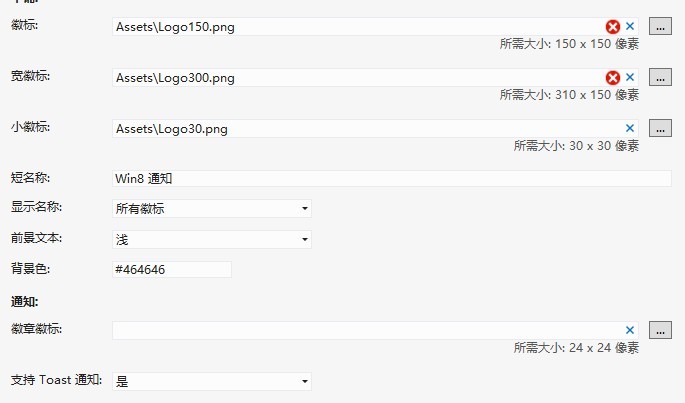
其次:打开Package.appxmanifest重新设置各种徽标。
最后:打开Package.appxmanifest,设置“支持Toast通知”为“是”。
Toast:
复制代码代码如下:
private void ToastNotice_Click(object sender, RoutedEventArgs e)
{
//Toast通知文字以及图片设置
IToastImageAndText01 Toast = ToastContentFactory.CreateToastImageAndText01();
Toast.TextBodyWrap.Text = "今日世界末日倒数10天!";
Toast.Image.Src = "http://news.shangdu.com/301/20120512/P_5626361_0__1686841290.jpg";
ToastNotificationManager.CreateToastNotifier().Show(Toast.CreateNotification());
}
效果图片:

Tile:
复制代码代码如下:
private void TileNotice_Click(object sender, RoutedEventArgs e)
{
//Tile通知文字以及图片设置
ITileWideImageAndText01 tile = TileContentFactory.CreateTileWideImageAndText01();
tile.TextCaptionWrap.Text = "小资情有独钟 10款合资热销时尚车型导购";
tile.Image.Src = "http://news.mycar168.com/uploadfile/2011/1030/20111030040816628.jpg";/p
ITileSquareImage wideImageContent = TileContentFactory.CreateTileSquareImage();
wideImageContent.Image.Src = "http://news.mycar168.com/uploadfile/2011/1030/20111030040816628.jpg";
tile.SquareContent = wideImageContent;
TileUpdateManager.CreateTileUpdaterForApplication().Update(tile.CreateNotification());
}
private void ClearTile_Click(object sender, RoutedEventArgs e)
{
//清除Tile通知
TileUpdateManager.CreateTileUpdaterForApplication().Clear();
}
效果图片:

Badge:
复制代码代码如下:
private void BadgeNotice_Click(object sender, RoutedEventArgs e)
{
//Badge数字通知
BadgeNumericNotificationContent badge = new BadgeNumericNotificationContent(29);
BadgeUpdateManager.CreateBadgeUpdaterForApplication().Update(badge.CreateNotification());
}/p
private void BadgeImage_Click(object sender, RoutedEventArgs e)
{
//Badge状态图片通知
BadgeGlyphNotificationContent badge = new BadgeGlyphNotificationContent(GlyphValue.Paused);
BadgeUpdateManager.CreateBadgeUpdaterForApplication().Update(badge.CreateNotification());
}
private void BadgeClear_Click(object sender, RoutedEventArgs e)
{
//清楚Badge通知
BadgeUpdateManager.CreateBadgeUpdaterForApplication().Clear();
}
图片效果见图片右下角:


Xaml:
复制代码代码如下:
Grid Background="{StaticResource ApplicationPageBackgroundThemeBrush}"
Button Content="Toast通知" HorizontalAlignment="Left" Name="ToastNotice"
Margin="250,172,0,0" VerticalAlignment="Top" Click="ToastNotice_Click"/
Button Content="Tile 通知" HorizontalAlignment="Left" Name="TileNotice"
Margin="394,172,0,0" VerticalAlignment="Top" Click="TileNotice_Click"/
Button Content="清除Tile通知" HorizontalAlignment="Left" Name="ClearTile"
Margin="559,172,0,0" VerticalAlignment="Top" Click="ClearTile_Click" /
Button Content="Badge数字" HorizontalAlignment="Left" Name="BadgeNotice"
Margin="250,270,0,0" VerticalAlignment="Top" Click="BadgeNotice_Click"/
Button Content="Badge图片" HorizontalAlignment="Left" Name="BadgeImage"
Margin="394,270,0,0" VerticalAlignment="Top" Click="BadgeImage_Click" /
Button Content="Badge清除" HorizontalAlignment="Left" x:Name="BadgeClear"
Margin="559,270,0,0" VerticalAlignment="Top" Click="BadgeClear_Click" /
/Grid
最后如需源码请点击 下载。




















