
禁用Windows Vista的本地搜索历史记录
番茄系统家园 · 2022-09-19 05:50:15
在Windows Vista中,由于内置了Windows Search ,系统在用户输入内容到搜索框时会自动显示搜索建议,而这些建议,其实就是之前保存的搜索历史记录。
其实,这个建议也是可以禁用的。
* WIN+R运行gpedit.msc打开组策略编辑器
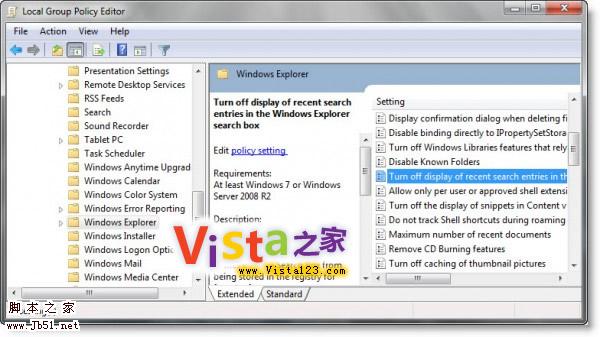
* 在左侧面板中依次打开用户配置 >管理模版 > Windows组件 > Windows Explorer
*在右侧面板中找到Turn Off Display Of Recent Search Entries In The Windows Explorer
* 双击选择“启用”即可。
附部分原文:
Windows Explorer shows suggestion pop-ups as users type into the Search Box. These suggestions are based on their past entries into the Search Box.
.....
猜你喜欢
最新应用







热门应用













