
将Google搜索设置成Vista的开始菜单搜索
番茄系统家园 · 2022-11-24 00:59:50
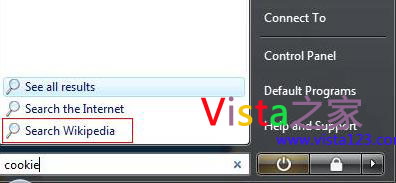
我们都知道,Windows 7有个功能名叫Federated Search,可以在桌面上搜索网络上的内容。其实,在Vista下,我们也可以在开始菜单的搜索中搜索Google,Wikipedia或Yahoo上的内容。
*开始-输入gpedit.msc打开组策略编辑器
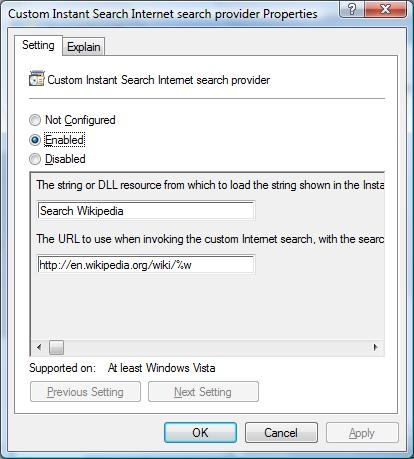
*打开用户配置 > 管理模板 > Windows 组件 > Instant Search >自定义 Instant Search
*在设置选项卡下,选择“启动”
*在“dll资源”对话框里输入搜索名称,比如Search Google
*在“URL”对话框里输入搜索地址,比如:
Wikipedia: http://en.wikipedia.org/wiki/%w
Google: http://www.google.com/search?q=%w
Yahoo: http://search.yahoo.com/search?p=%w
*点击确定保存设置
*重启生效
附部分原文:
If you spend a lot of time in searching useful information in Wikipedia, Google or Yahoo, instead of going to Wikipedia or Google or Yahoo homepage itself to type the keyword and perform the searching, you actually can add search Wikipedia, Google, Yahoo option to Windows Vista Start Menu Instant Search Box so that you can type the keyword from the search box and choose to search in either Wikipedia, Google or Yahoo websites.
...




















