
移除未知文件格式打开方式列表中的错误程序
番茄系统家园 · 2022-11-28 01:09:02
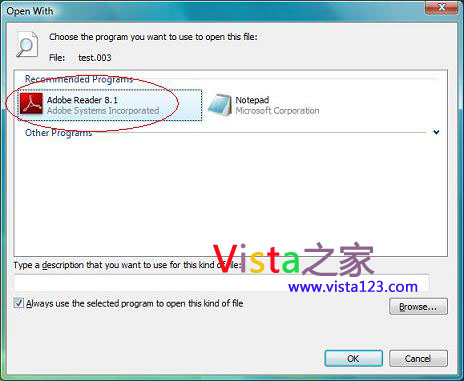
我们知道,未知文件格式的文件会显示成一张白纸一样的东西,每当双击此类文件时,系统会弹出打开方式对话框,而如果你之前误用某程序打开了这个文件,那该程序就会出现在打开方式的程序列表中。比如,新建一个文件,名为,test.003,用Adobe Reader打开一次,此后每次双击此文件都会出现下面的对话框。那么,怎么去掉呢?
*Win+R运行regedit
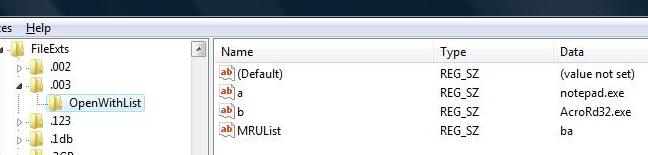
*定位到HKEY_CURRENT_USER\Software\Microsoft\Windows\CurrentVersion\Explorer\FileExts\[file extension]\OpenWithList
*在左侧列表中找到文件扩展名,比如,我们所说的.003
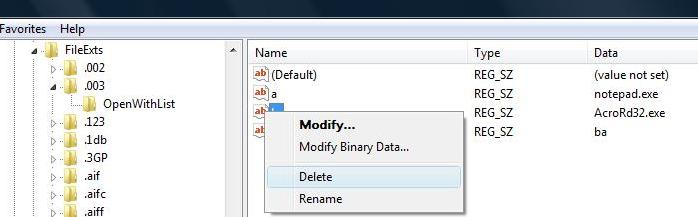
*在右侧找到要删除的程序键值,比如,我们举例的Adobe Reader,在注册表中的键值名为AcroRd32.exe,右键-删除即可
附部分原文:
If you accidentally open a file with wrong program, you will notice the program used to open the file is added to the recommended program list. The reason is Windows remembers you have used the program to open it once. Once it is added, it will be there forever although it is not the correct program used to open this file. For instance, test.003 is supposed to be opened by using notepad, but if you accidentally open it with Adobe, so you will see Adobe being added to the recommended program list for all files with .003 extension. How to remove the wrong recommended program from the Open With window? Here you can remove it by doing some simple tricks.
...




















