
Windows20H2系统更新后系统提示更新错误怎么办?
番茄系统家园 · 2022-08-01 05:58:29
用户在更新20H2版本后,设置里的更新和安全选项卡,windows系统更新提示出现错误,并建议重新打开设置。遇到这种情况该如何解决呢?我们一起来看看吧!
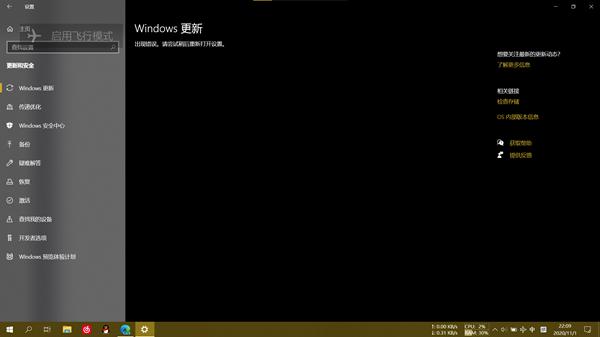
具体解决步骤:
1、以管理员权限打开cmd,输入以下命令;
- 01 SC config wuauserv start= auto
- 02 SC config bits start= auto
- 03 SC config cryptsvc start= auto
- 04 SC config trustedinstaller start= auto
- 05 SC config wuauserv type=share
复制代码
SC config wuauserv start= auto SC config bits start= auto SC config cryptsvc start= auto SC config trustedinstaller start= auto SC config wuauserv type=share
2、然后输入;
- 01 net stop wuauserv
- 02 net stop cryptSvc
- 03 net stop bits
- 04 net stop msiserver
- 05 ren C:\Windows\SoftwareDistribution SoftwareDistribution.old
- 06 ren C:\Windows\System32\catroot2 catroot2.old
- 07 net start wuauserv
- 08 net start cryptSvc
- 09 net start bits
- 10 net start msiserver
复制代码
net stop wuauserv net stop cryptSvc net stop bits net stop msiserver ren C:\Windows\SoftwareDistribution SoftwareDistribution.old ren C:\Windows\System32\catroot2 catroot2.old net start wuauserv net start cryptSvc net start bits net start msiserver
重启后,windows20H2中系统更新后,Windows更新出现错误的问题就解决了,你也来试试吧!
免责声明: 凡标注转载/编译字样内容并非本站原创,转载目的在于传递更多信息,并不代表本网赞同其观点和对其真实性负责。如果你觉得本文好,欢迎推荐给朋友阅读;本文链接: https://m.nndssk.com/xtjc/293417PHnzi1.html。猜你喜欢
最新应用







热门应用













