
Excel有密码怎么破解?Excel密码破解方法介绍
番茄系统家园 · 2022-12-16 06:16:30
Excel密码破解方法有很多,最常见的便是使用密码字典去解读,解读成功即为破解,而本次使用的是宏命令,若是你还在一筹莫展,可以看看下文中的方法,因为涉及Excel重要文件,若是别人的东西,请获取授权!
Excel密码破解方法介绍:
1、进入加密的 Excel 用快捷命令Alt+F8 打开宏命令 窗口。
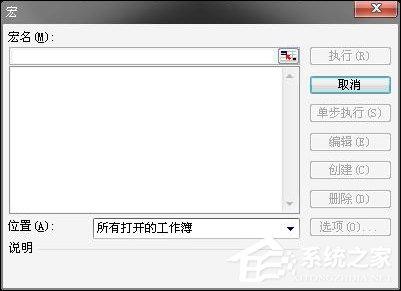
2、在宏名一栏中 输入宏的名字 随意健入即可。
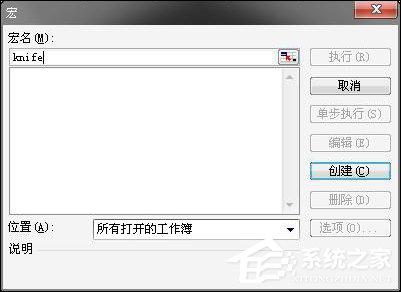
3、输入完宏名后 创建的按钮就亮了 点击创建 我们就可以来到 新的界面了。
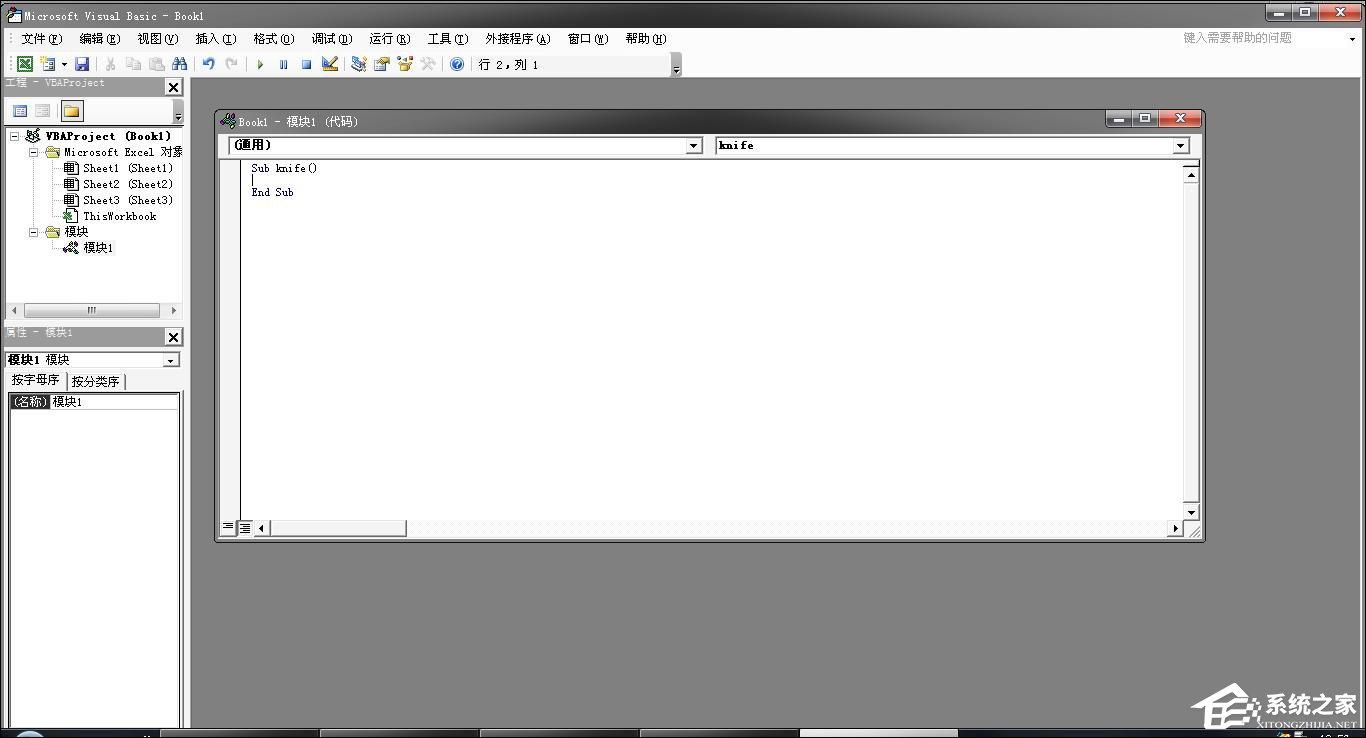
4、将编辑框内的Sub knife( )End Sub删除 将下列代码 复制 上去。
- 01 Option Explicit
- 02 Public Sub AllInternalPasswords()
- 03 ' Breaks worksheet and workbook structure passwords. Bob McCormick
- 04 ' probably originator of base code algorithm modified for coverage
- 05 ' of workbook structure / windows passwords and for multiple passwords
- 06 '
- 07 ' Norman Harker and JE McGimpsey 27-Dec-2002 (Version 1.1)
- 08 ' Modified 2003-Apr-04 by JEM: All msgs to constants, and
- 09 ' eliminate one Exit Sub (Version 1.1.1)
- 10 ' Reveals hashed passwords NOT original passwords
- 11 Const DBLSPACE As String = vbNewLine & vbNewLine
- 12 Const AUTHORS As String = DBLSPACE & vbNewLine & _
- 13 "Adapted from Bob McCormick base code by" & _
- 14 "Norman Harker and JE McGimpsey"
- 15 Const HEADER As String = "AllInternalPasswords User Message"
- 16 Const VERSION As String = DBLSPACE & "Version 1.1.1 2003-Apr-04"
- 17 Const REPBACK As String = DBLSPACE & "Please report failure " & _
- 18 "to the microsoft.public.excel.programming newsgroup."
- 19 Const ALLCLEAR As String = DBLSPACE & "The workbook should " & _
- 20 "now be free of all password protection, so make sure you:" & _
- 21 DBLSPACE & "SAVE IT NOW!" & DBLSPACE & "and also" & _
- 22 DBLSPACE & "BACKUP!, BACKUP!!, BACKUP!!!" & _
- 23 DBLSPACE & "Also, remember that the password was " & _
- 24 "put there for a reason. Don't stuff up crucial formulas " & _
- 25 "or data." & DBLSPACE & "Access and use of some data " & _
- 26 "may be an offense. If in doubt, don't."
- 27 Const MSGNOPWORDS1 As String = "There were no passwords on " & _
- 28 "sheets, or workbook structure or windows." & AUTHORS & VERSION
- 29 Const MSGNOPWORDS2 As String = "There was no protection to " & _
- 30 "workbook structure or windows." & DBLSPACE & _
- 31 "Proceeding to unprotect sheets." & AUTHORS & VERSION
- 32 Const MSGTAKETIME As String = "After pressing OK button this " & _
- 33 "will take some time." & DBLSPACE & "Amount of time " & _
- 34 "depends on how many different passwords, the " & _
- 35 "passwords, and your computer's specification." & DBLSPACE & _
- 36 "Just be patient! Make me a coffee!" & AUTHORS & VERSION
- 37 Const MSGPWORDFOUND1 As String = "You had a Worksheet " & _
- 38 "Structure or Windows Password set." & DBLSPACE & _
- 39 "The password found was: " & DBLSPACE & "$$" & DBLSPACE & _
- 40 "Note it down for potential future use in other workbooks by " & _
- 41 "the same person who set this password." & DBLSPACE & _
- 42 "Now to check and clear other passwords." & AUTHORS & VERSION
- 43 Const MSGPWORDFOUND2 As String = "You had a Worksheet " & _
- 44 "password set." & DBLSPACE & "The password found was: " & _
- 45 DBLSPACE & "$$" & DBLSPACE & "Note it down for potential " & _
- 46 "future use in other workbooks by same person who " & _
- 47 "set this password." & DBLSPACE & "Now to check and clear " & _
- 48 "other passwords." & AUTHORS & VERSION
- 49 Const MSGONLYONE As String = "Only structure / windows " & _
- 50 "protected with the password that was just found." & _
- 51 ALLCLEAR & AUTHORS & VERSION & REPBACK
- 52 Dim w1 As Worksheet, w2 As Worksheet
- 53 Dim i As Integer, j As Integer, k As Integer, l As Integer
- 54 Dim m As Integer, n As Integer, i1 As Integer, i2 As Integer
- 55 Dim i3 As Integer, i4 As Integer, i5 As Integer, i6 As Integer
- 56 Dim PWord1 As String
- 57 Dim ShTag As Boolean, WinTag As Boolean
- 58 Application.ScreenUpdating = False
- 59 With ActiveWorkbook
- 60 WinTag = .ProtectStructure Or .ProtectWindows
- 61 End With
- 62 ShTag = False
- 63 For Each w1 In Worksheets
- 64 ShTag = ShTag Or w1.ProtectContents
- 65 Next w1
- 66 If Not ShTag And Not WinTag Then
- 67 MsgBox MSGNOPWORDS1, vbInformation, HEADER
- 68 Exit Sub
- 69 End If
- 70 MsgBox MSGTAKETIME, vbInformation, HEADER
- 71 If Not WinTag Then
- 72 MsgBox MSGNOPWORDS2, vbInformation, HEADER
- 73 Else
- 74 On Error Resume Next
- 75 Do 'dummy do loop
- 76 For i = 65 To 66: For j = 65 To 66: For k = 65 To 66
- 77 For l = 65 To 66: For m = 65 To 66: For i1 = 65 To 66
- 78 For i2 = 65 To 66: For i3 = 65 To 66: For i4 = 65 To 66
- 79 For i5 = 65 To 66: For i6 = 65 To 66: For n = 32 To 126
- 80 With ActiveWorkbook
- 81.Unprotect Chr(i) & Chr(j) & Chr(k) & _
- 82 Chr(l) & Chr(m) & Chr(i1) & Chr(i2) & _
- 83 Chr(i3) & Chr(i4) & Chr(i5) & Chr(i6) & Chr(n)
- 84 If .ProtectStructure = False And _
- 85.ProtectWindows = False Then
- 86 PWord1 = Chr(i) & Chr(j) & Chr(k) & Chr(l) & _
- 87 Chr(m) & Chr(i1) & Chr(i2) & Chr(i3) & _
- 88 Chr(i4) & Chr(i5) & Chr(i6) & Chr(n)
- 89 MsgBox Application.Substitute(MSGPWORDFOUND1, _
- 90 "$$", PWord1), vbInformation, HEADER
- 91 Exit Do 'Bypass all for...nexts
- 92 End If
- 93 End With
- 94 Next: Next: Next: Next: Next: Next
- 95 Next: Next: Next: Next: Next: Next
- 96 Loop Until True
- 97 On Error GoTo 0
- 98 End If
- 99 If WinTag And Not ShTag Then
- 100 MsgBox MSGONLYONE, vbInformation, HEADER
- 101 Exit Sub
- 102 End If
- 103 On Error Resume Next
- 104 For Each w1 In Worksheets
- 105 'Attempt clearance with PWord1
- 106 w1.Unprotect PWord1
- 107 Next w1
- 108 On Error GoTo 0
- 109 ShTag = False
- 110 For Each w1 In Worksheets
- 111 'Checks for all clear ShTag triggered to 1 if not.
- 112 ShTag = ShTag Or w1.ProtectContents
- 113 Next w1
- 114 If ShTag Then
- 115 For Each w1 In Worksheets
- 116 With w1
- 117 If .ProtectContents Then
- 118 On Error Resume Next
- 119 Do 'Dummy do loop
- 120 For i = 65 To 66: For j = 65 To 66: For k = 65 To 66
- 121 For l = 65 To 66: For m = 65 To 66: For i1 = 65 To 66
- 122 For i2 = 65 To 66: For i3 = 65 To 66: For i4 = 65 To 66
- 123 For i5 = 65 To 66: For i6 = 65 To 66: For n = 32 To 126
- 124.Unprotect Chr(i) & Chr(j) & Chr(k) & _
- 125 Chr(l) & Chr(m) & Chr(i1) & Chr(i2) & Chr(i3) & _
- 126 Chr(i4) & Chr(i5) & Chr(i6) & Chr(n)
- 127 If Not .ProtectContents Then
- 128 PWord1 = Chr(i) & Chr(j) & Chr(k) & Chr(l) & _
- 129 Chr(m) & Chr(i1) & Chr(i2) & Chr(i3) & _
- 130 Chr(i4) & Chr(i5) & Chr(i6) & Chr(n)
- 131 MsgBox Application.Substitute(MSGPWORDFOUND2, _
- 132 "$$", PWord1), vbInformation, HEADER
- 133 'leverage finding Pword by trying on other sheets
- 134 For Each w2 In Worksheets
- 135 w2.Unprotect PWord1
- 136 Next w2
- 137 Exit Do 'Bypass all for...nexts
- 138 End If
- 139 Next: Next: Next: Next: Next: Next
- 140 Next: Next: Next: Next: Next: Next
- 141 Loop Until True
- 142 On Error GoTo 0
- 143 End If
- 144 End With
- 145 Next w1
- 146 End If
- 147 MsgBox ALLCLEAR & AUTHORS & VERSION & REPBACK, vbInformation, HEADER
- 148 End Sub
复制代码
Option Explicit Public Sub AllInternalPasswords() ' Breaks worksheet and workbook structure passwords. Bob McCormick ' probably originator of base code algorithm modified for coverage ' of workbook structure / windows passwords and for multiple passwords ' ' Norman Harker and JE McGimpsey 27-Dec-2002 (Version 1.1) ' Modified 2003-Apr-04 by JEM: All msgs to constants, and ' eliminate one Exit Sub (Version 1.1.1) ' Reveals hashed passwords NOT original passwords Const DBLSPACE As String = vbNewLine & vbNewLine Const AUTHORS As String = DBLSPACE & vbNewLine & _ "Adapted from Bob McCormick base code by" & _ "Norman Harker and JE McGimpsey" Const HEADER As String = "AllInternalPasswords User Message" Const VERSION As String = DBLSPACE & "Version 1.1.1 2003-Apr-04" Const REPBACK As String = DBLSPACE & "Please report failure " & _ "to the microsoft.public.excel.programming newsgroup." Const ALLCLEAR As String = DBLSPACE & "The workbook should " & _ "now be free of all password protection, so make sure you:" & _ DBLSPACE & "SAVE IT NOW!" & DBLSPACE & "and also" & _ DBLSPACE & "BACKUP!, BACKUP!!, BACKUP!!!" & _ DBLSPACE & "Also, remember that the password was " & _ "put there for a reason. Don't stuff up crucial formulas " & _ "or data." & DBLSPACE & "Access and use of some data " & _ "may be an offense. If in doubt, don't." Const MSGNOPWORDS1 As String = "There were no passwords on " & _ "sheets, or workbook structure or windows." & AUTHORS & VERSION Const MSGNOPWORDS2 As String = "There was no protection to " & _ "workbook structure or windows." & DBLSPACE & _ "Proceeding to unprotect sheets." & AUTHORS & VERSION Const MSGTAKETIME As String = "After pressing OK button this " & _ "will take some time." & DBLSPACE & "Amount of time " & _ "depends on how many different passwords, the " & _ "passwords, and your computer's specification." & DBLSPACE & _ "Just be patient! Make me a coffee!" & AUTHORS & VERSION Const MSGPWORDFOUND1 As String = "You had a Worksheet " & _ "Structure or Windows Password set." & DBLSPACE & _ "The password found was: " & DBLSPACE & "$$" & DBLSPACE & _ "Note it down for potential future use in other workbooks by " & _ "the same person who set this password." & DBLSPACE & _ "Now to check and clear other passwords." & AUTHORS & VERSION Const MSGPWORDFOUND2 As String = "You had a Worksheet " & _ "password set." & DBLSPACE & "The password found was: " & _ DBLSPACE & "$$" & DBLSPACE & "Note it down for potential " & _ "future use in other workbooks by same person who " & _ "set this password." & DBLSPACE & "Now to check and clear " & _ "other passwords." & AUTHORS & VERSION Const MSGONLYONE As String = "Only structure / windows " & _ "protected with the password that was just found." & _ ALLCLEAR & AUTHORS & VERSION & REPBACK Dim w1 As Worksheet, w2 As Worksheet Dim i As Integer, j As Integer, k As Integer, l As Integer Dim m As Integer, n As Integer, i1 As Integer, i2 As Integer Dim i3 As Integer, i4 As Integer, i5 As Integer, i6 As Integer Dim PWord1 As String Dim ShTag As Boolean, WinTag As Boolean Application.ScreenUpdating = False With ActiveWorkbook WinTag = .ProtectStructure Or .ProtectWindows End With ShTag = False For Each w1 In Worksheets ShTag = ShTag Or w1.ProtectContents Next w1 If Not ShTag And Not WinTag Then MsgBox MSGNOPWORDS1, vbInformation, HEADER Exit Sub End If MsgBox MSGTAKETIME, vbInformation, HEADER If Not WinTag Then MsgBox MSGNOPWORDS2, vbInformation, HEADER Else On Error Resume Next Do 'dummy do loop For i = 65 To 66: For j = 65 To 66: For k = 65 To 66 For l = 65 To 66: For m = 65 To 66: For i1 = 65 To 66 For i2 = 65 To 66: For i3 = 65 To 66: For i4 = 65 To 66 For i5 = 65 To 66: For i6 = 65 To 66: For n = 32 To 126 With ActiveWorkbook .Unprotect Chr(i) & Chr(j) & Chr(k) & _ Chr(l) & Chr(m) & Chr(i1) & Chr(i2) & _ Chr(i3) & Chr(i4) & Chr(i5) & Chr(i6) & Chr(n) If .ProtectStructure = False And _ .ProtectWindows = False Then PWord1 = Chr(i) & Chr(j) & Chr(k) & Chr(l) & _ Chr(m) & Chr(i1) & Chr(i2) & Chr(i3) & _ Chr(i4) & Chr(i5) & Chr(i6) & Chr(n) MsgBox Application.Substitute(MSGPWORDFOUND1, _ "$$", PWord1), vbInformation, HEADER Exit Do 'Bypass all for...nexts End If End With Next: Next: Next: Next: Next: Next Next: Next: Next: Next: Next: Next Loop Until True On Error GoTo 0 End If If WinTag And Not ShTag Then MsgBox MSGONLYONE, vbInformation, HEADER Exit Sub End If On Error Resume Next For Each w1 In Worksheets 'Attempt clearance with PWord1 w1.Unprotect PWord1 Next w1 On Error GoTo 0 ShTag = False For Each w1 In Worksheets 'Checks for all clear ShTag triggered to 1 if not. ShTag = ShTag Or w1.ProtectContents Next w1 If ShTag Then For Each w1 In Worksheets With w1 If .ProtectContents Then On Error Resume Next Do 'Dummy do loop For i = 65 To 66: For j = 65 To 66: For k = 65 To 66 For l = 65 To 66: For m = 65 To 66: For i1 = 65 To 66 For i2 = 65 To 66: For i3 = 65 To 66: For i4 = 65 To 66 For i5 = 65 To 66: For i6 = 65 To 66: For n = 32 To 126 .Unprotect Chr(i) & Chr(j) & Chr(k) & _ Chr(l) & Chr(m) & Chr(i1) & Chr(i2) & Chr(i3) & _ Chr(i4) & Chr(i5) & Chr(i6) & Chr(n) If Not .ProtectContents Then PWord1 = Chr(i) & Chr(j) & Chr(k) & Chr(l) & _ Chr(m) & Chr(i1) & Chr(i2) & Chr(i3) & _ Chr(i4) & Chr(i5) & Chr(i6) & Chr(n) MsgBox Application.Substitute(MSGPWORDFOUND2, _ "$$", PWord1), vbInformation, HEADER 'leverage finding Pword by trying on other sheets For Each w2 In Worksheets w2.Unprotect PWord1 Next w2 Exit Do 'Bypass all for...nexts End If Next: Next: Next: Next: Next: Next Next: Next: Next: Next: Next: Next Loop Until True On Error GoTo 0 End If End With Next w1 End If MsgBox ALLCLEAR & AUTHORS & VERSION & REPBACK, vbInformation, HEADER End Sub
5、关闭 宏窗口 回到Excel下 按ALT+F8 重新打开 宏命令窗口。

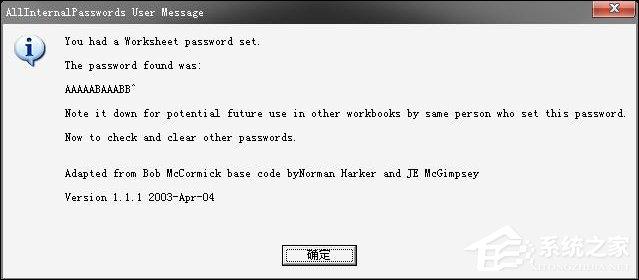
6、你会发现 你前面输入的宏名 变成了AllInternalPasswords 点击执行 会出现如下对话框 点确定。
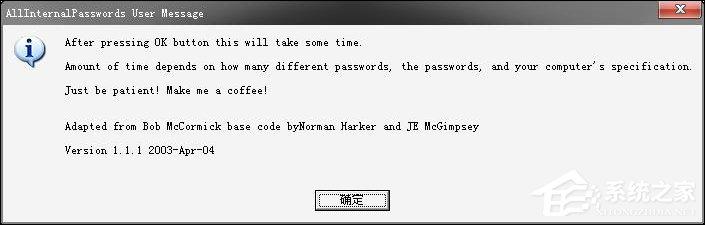
7、一直点 确定 直到不在 出现对话框为止。
8、等待 一段之间之后 系统会 再次跳出对话框 再点确定 保护就破解成功了。
!!!注: 以上方法仅作为参考教材,请勿用于非法途径。
以上内容便是Excel密码破解方法的操作步骤,下次请用户在设置Excel密码的时候尽可能的简单一些,并记录下密码备份,避免再次需要使用宏。
免责声明: 凡标注转载/编译字样内容并非本站原创,转载目的在于传递更多信息,并不代表本网赞同其观点和对其真实性负责。如果你觉得本文好,欢迎推荐给朋友阅读;本文链接: https://m.nndssk.com/xtjc/276646U7Kc6i.html。



















