
电脑提示reboot and select proper boot devic怎么办
番茄系统家园 · 2023-10-29 13:33:42
重装系统也未必是个万全之策,可是重装后发现电脑开机会显示黑底白字,然后给出提示:reboot and select proper boot device,这是怎么回事?出现这样的提示一般是引导出错所致。为了帮助到了大家,为此,小编就给大家带来了解决的方法了。
电脑使用是越来越普及了而遇到电脑的故障也越来越来多,这不,最近有用户在电脑开机时遇到显示黑屏,并提示Reboot and Select proper Boot device,无法正常启动电脑系统。这是怎么回事呢?又该怎么去解决呢?让用户一头雾水,下面,小编就来跟大家介绍win8设置共享文件夹的方法。
电脑提示reboot and select proper boot device如何解决
这里是Acer的主板,就取这个为例。
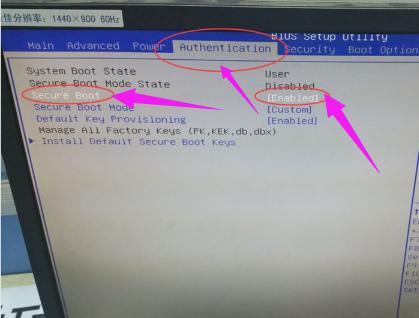
点击del 进入boot 界面。可以看到原先的设置是这样
重启图-1
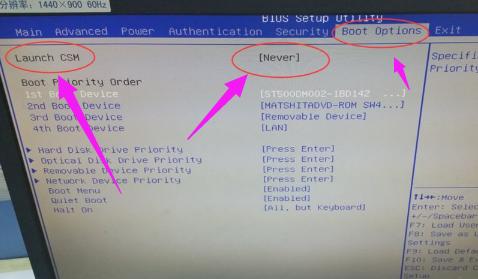
这个是由于开启了安全boot模式验证导致boot options 项下的Launch CSM,为不可更改 灰度状态 Never。
电脑提示图-2
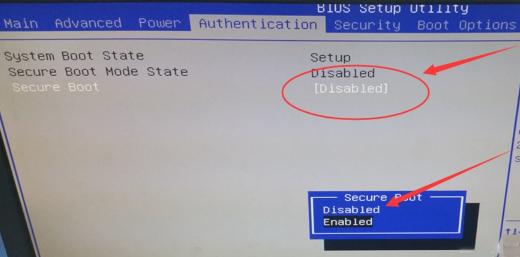
但当我们将选项改为disable时。
电脑提示图-3
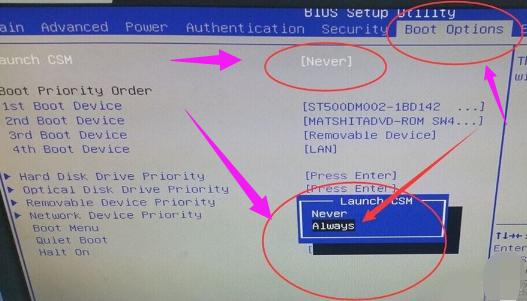
对应的Launch CSM,变为可更改 ,将never 改为always 。
启动图-4
F10保存重启就可以进入Win7了。
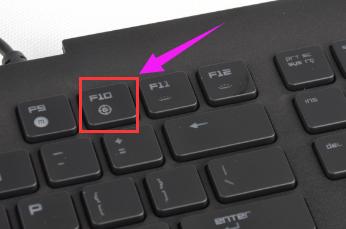
重新启动图-5
以上就是解决reboot and select proper boot device的方法了。
免责声明: 凡标注转载/编译字样内容并非本站原创,转载目的在于传递更多信息,并不代表本网赞同其观点和对其真实性负责。如果你觉得本文好,欢迎推荐给朋友阅读;本文链接: https://m.nndssk.com/xtjc/2581364RePtl.html。猜你喜欢
最新应用







热门应用













