
win7安装mongodb及命令运行教程
番茄系统家园 · 2022-10-18 07:47:05
1:先上官网:
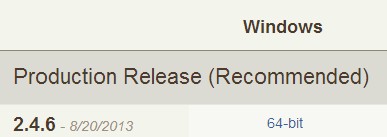
2:用cmd运行目录下bin下的mongod.exe来安装服务:
--reinstall 是重新安装,首次安装没有开--reset参数,所以用了重装参数。
--install 是安装。
(后来重启电脑后,那个删不掉的服务自己消失了)
如果看不懂E文,可以复制拿去Google翻译文档。
复制代码代码如下:
E:\mongodb246\binmongod.exe -help
Allowed options:/p
General options:
-h [ --help ] show this usage information
--version show version information
-f [ --config ] arg configuration file specifying additional options
-v [ --verbose ]be more verbose (include multiple times for more
verbosity e.g. -vvvvv)
--quiet quieter output
--port argspecify port number - 27017 by default
--bind_ip arg comma separated list of ip addresses to listen on
- all local ips by default
--maxConns argmax number of simultaneous connections - 20000 by
default
--logpath arg log file to send write to instead of stdout - has
to be a file, not directory
--logappend append to logpath instead of over-writing
--pidfilepath arg full path to pidfile (if not set, no pidfile is
created)
--keyFile arg private key for cluster authentication
--setParameter argSet a configurable parameter
--authrun with security
--cpu periodically show cpu and iowait utilization
--dbpath argdirectory for datafiles - defaults to \data\db\
--diaglog arg 0=off 1=W 2=R 3=both 7=W+some reads
--directoryperdbeach database will be stored in a separate
directory
--ipv6enable IPv6 support (disabled by default)
--journal enable journaling
--journalCommitInterval arg how often to group/batch commit (ms)
--journalOptions argjournal diagnostic options
--jsonp allow JSONP access via http (has security
implications)
--noauthrun without security
--nohttpinterface disable http interface
--nojournal disable journaling (journaling is on by default
for 64 bit)
--nopreallocdisable data file preallocation - will often hurt
performance
--noscripting disable scripting engine
--notablescan do not allow table scans
--nssize arg (=16).ns file size (in MB) for new databases
--profile arg 0=off 1=slow, 2=all
--quota limits each database to a certain number of files
(8 default)
--quotaFiles argnumber of files allowed per db, requires --quota
--repairrun repair on all dbs
--repairpath argroot directory for repair files - defaults to
dbpath
--restturn on simple rest api
--slowms arg (=100) value of slow for profile and console log
--smallfilesuse a smaller default file size
--syncdelay arg (=60) seconds between disk syncs (0=never, but not
recommended)
--sysinfo print some diagnostic system information
--upgrade upgrade db if needed
Windows Service Control Manager options:
--installinstall Windows service
--remove remove Windows service
--reinstallreinstall Windows service (equivalent to --remove
followed by --install)
--serviceName argWindows service name
--serviceDisplayName arg Windows service display name
--serviceDescription arg Windows service description
--serviceUser argaccount for service execution
--servicePassword argpassword used to authenticate serviceUser
Replication options:
--oplogSize arg size to use (in MB) for replication op log. default is
5% of disk space (i.e. large is good)
Master/slave options (old; use replica sets instead):
--mastermaster mode
--slave slave mode
--source argwhen slave: specify master as
--only argwhen slave: specify a single database to replicate
--slavedelay argspecify delay (in seconds) to be used when applying
master ops to slave
--autoresyncautomatically resync if slave data is stale
Replica set options:
--replSet arg arg is
--replIndexPrefetch arg specify index prefetching behavior (if secondary)
[none|_id_only|all]
Sharding options:
--configsvr declare this is a config db of a cluster; default port
27019; default dir /data/configdb
--shardsvrdeclare this is a shard db of a cluster; default port
27018
>
安装好后,浏览器运行:http://127.0.0.1:28017 打开有东西就说明装上了,按理是localhost:端口可上的,不知我电脑是有缓存还是咋的,没反应,换上IP刷新就好了。
打开是这么个界面:
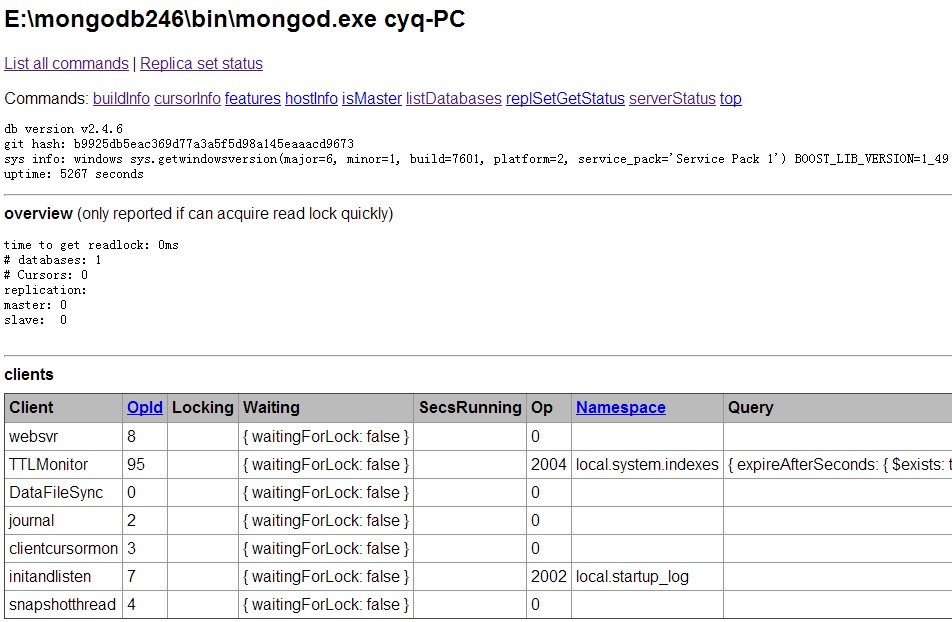
目前着实没看出什么信息,基本正常到此,可能会被卡住,不知道后续干什么了。
3:链接进入命令模式:
正常来说,在cmd命令下,运行E:\>mongodb246\bin\mongo.exe,(路径自己弄对)直接就连上了:
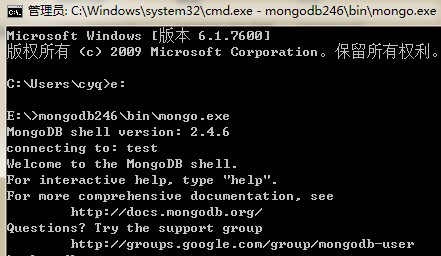
之后可以运行点命令测试下,如:
相关基础命令可以看:
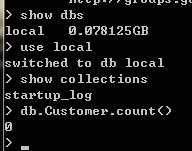
再接下来,就是怎么用代码开发的问题了
免责声明: 凡标注转载/编译字样内容并非本站原创,转载目的在于传递更多信息,并不代表本网赞同其观点和对其真实性负责。如果你觉得本文好,欢迎推荐给朋友阅读;本文链接: https://m.nndssk.com/rjwt/155388p9PfXI.html。



















