PDF文件签署工具(PDF Power Tool)
PDF文件签署工具(PDF Power Tool),PDFPowerTool是一个免费的程序,将让你从数字化的命令行签署PDF文件。所有你需要上手证书和PDF文件。如果你没有一个真正的证书,那么我们就可以帮助您创建一个测试证书,你可以用它来测试我们的软件的功能。
PDF Power Tool是一个免费的程序,将让你从数字化的命令行签署PDF文件。所有你需要上手证书和PDF文件。如果你没有一个真正的证书,那么我们就可以帮助您创建一个测试证书,你可以用它来测试我们的软件的功能。
软件截图1
命令用法:
PdfPowerTool.exe [PARAMETERS]
Parameter Description
----------------- -------------------------------------------------------------
/INPUT File name of PDF document to sign.
/OUTPUT File name of resulting signed PDF document.
/SIGNCERTIFICATE File name of PFX certificate file.
/SIGNPASSWORD Password for certificate.
/SIGNCONTACT Name of contact.
/SIGNREASON Sign reason.
/SIGNLOCATION Sign location.
/SIGN Sign the PDF document.
/DISPLAYSIGNATURE Show a visible signatuer.
/SIGNPAGE Page to place visible signature on. Default is 1.
/SIGNLLX Lower left X coordinate for visible signature.
/SIGNLLY Lower left Y coordinate for visible signature.
/SIGNRUY Upper right X coordinate for visible signature.
/SIGNRUX Upper right Y coordinate for visible signature.
/RESPONSE File name of response file.
举例说明:
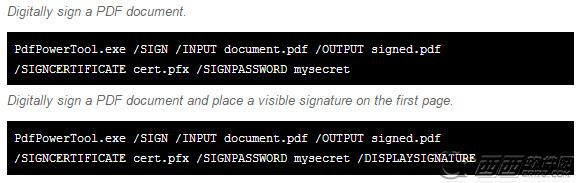
Sign a PDF document
Here is how to sign a PDF document with a visible signature on the first page.
PdfPowerTool.exe /INPUT mydocument.pdf /OUTPUT signed.pdf
/SIGNCERTIFICATE cert.pfx /SIGNPASSWORD mysecret /SIGN
Visible PDF signature
You can make the signature visible in the document with the /DISPLAYSIGNATURE command line switch.
PdfPowerTool.exe /INPUT mydocument.pdf /OUTPUT signed.pdf
/SIGNCERTIFICATE cert.pfx /SIGNPASSWORD mysecret /DISPLAYSIGNATURE /SIGN
应用信息
大小:0MB
软件版本: 3.0.0.9 最新版
语言:简体中文
授权方式:免费